
Settings and appearance
Android settings control both the overlay service and how Clash Caddie looks.
Overlay status
The status card shows whether Clash Caddie is running above other apps. Use Start or Stop to change it.
Overlay layout
- Ring overlay size changes the space used by ring-adjustment values.
- Input overlay size changes the keypad and club input panel.
- Ring opacity changes the ring panel transparency.
- Input opacity changes the input panel transparency.
- Alignment and side controls position the overlay around the parts of the game you need to see.
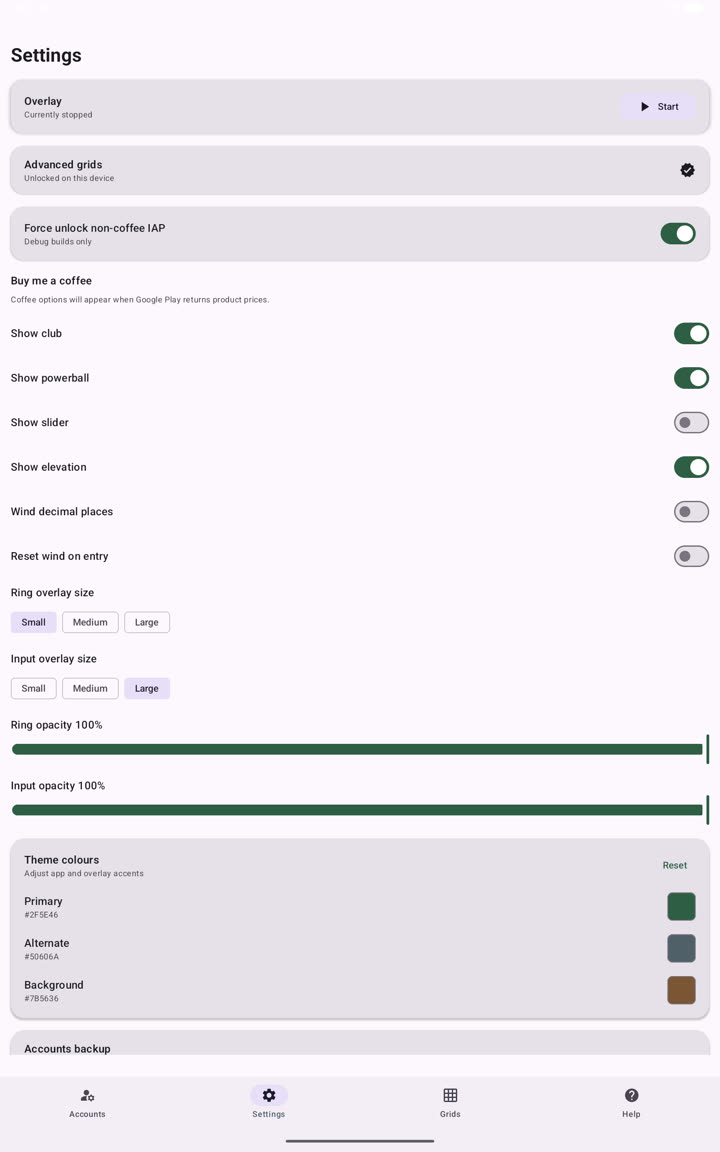
Theme colours
Open Theme colours to change semantic colours used across the Android app. Enter a six-digit hexadecimal colour such as #2F5E46, apply it and verify that text remains readable. Use Reset to return to the default palette.
Advanced grids
Purchase or restore the advanced-grid unlock from Settings. After it is active, use the Grids tab to create and manage programmable presets.
Account backup
Settings also provides export and import controls for the account database. Read Account backup before replacing existing accounts.